
OpenWeather
Openweather Ltd.Weather
3.7377.00 Reviews
- Version
- 1.2.3
- Installs
- 100.00K
- Age Rating
- Everyone
Screenshots
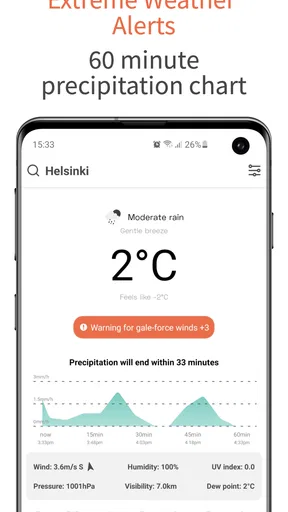
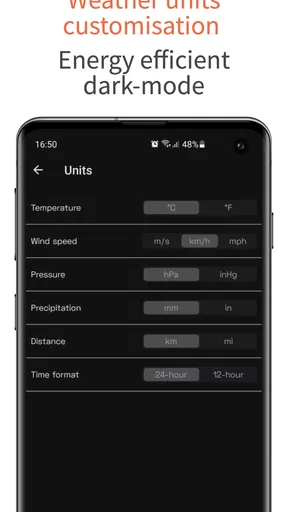
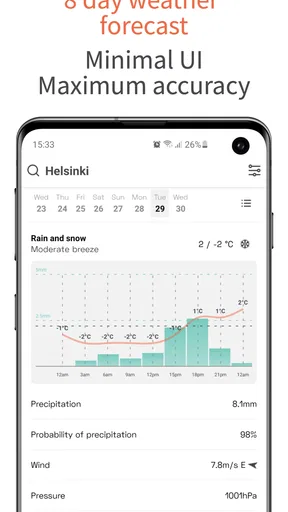
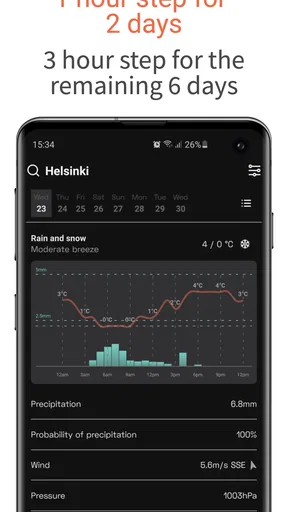
Our Review of OpenWeather
 Analysis by Appyee
Weather apps are easy to judge when everything works: open one, glance at the forecast, and leave. The real test comes when the forecast does not load, an alert seems late, or the information looks different from what another service shows. I spent time looking at OpenWeather from that practical angle, and my impression is that it is a straightforward free weather app best suited to people who want a quick forecast without turning weather into a complicated hobby.
It comes from Openweather Ltd. and sits in the weather category, with a focus on forecasts and alerts rather than extra lifestyle tools. The app is free, rated for Everyone, and has passed the early trial stage with over one hundred thousand installs. Its average score is around 3.7, which feels consistent with an app that can be useful in ordinary conditions but may require a little patience when setup, connectivity, or forecast interpretation gets in the way.
My recommendation is therefore fairly specific: I would try it if I wanted a light daily weather reference on an Android device, especially for commuting, errands, or deciding what to wear. I would be more cautious about relying on it as my only source for time-sensitive outdoor plans. The difference is not necessarily the forecast itself; it is that weather information always depends on location, update timing, network access, and the way each service presents changing conditions.
Where the first problems usually appear
The first point of friction is often not the forecast screen but the initial location choice. A weather app needs to know which place matters to you, and users can become unsure whether they should use their current position or search for a city manually. I prefer searching for a fixed place when I am checking a destination, because that avoids accidentally reading the weather for my present location while preparing for somewhere else.
That distinction matters in everyday use. If I am leaving home for work, current-location weather is convenient. If I am planning a weekend visit, a manually selected destination is safer. Mixing those two habits can make the app appear inconsistent even when it is simply showing the location that was selected earlier.
Another common sticking point is expecting a weather app to behave like a live observation service. A forecast is an estimate for a place and time, not a guarantee of what is happening on every street. A shower can pass over one neighborhood while another remains dry. If OpenWeather disagrees with what I see outside, I first check the selected location and the forecast time before assuming the app has failed.
Alerts can create a similar misunderstanding. An alert is useful as a prompt to check conditions, but I would not treat it as a substitute for looking at the forecast before a long drive, a hike, or an event. Weather changes quickly, and an alert can be less useful if I only notice it after I have already left.
The app’s store summary emphasizes accurate forecasts and weather alerts, but I found that the value depends heavily on how deliberately I use those elements. Opening it once in the morning gives me a broad plan. Opening it again before a change of activity gives me a more sensible basis for a decision. That small habit is more valuable than expecting one glance to remain accurate all day.
What I check before blaming the forecast
When information looks wrong, I use a simple order of checks. First, I confirm the place. Second, I look at the time attached to the forecast. Third, I check whether the phone is online and whether the app has had a chance to refresh. Only after those checks do I compare the result with another weather source.
This approach prevents a surprisingly common mistake: comparing two different locations or two different forecast periods. It also helps separate a temporary loading problem from a genuine difference between weather models. Two reputable services can disagree without either one being completely useless.
I also avoid judging the app from a single unusual day. Forecast quality is easiest to assess over repeated, ordinary use: morning temperature checks, commute decisions, and short-term rain planning. If the app repeatedly struggles to show the selected place or refreshes unreliably, that is more meaningful than one inaccurate prediction during rapidly changing weather.
Setup checks that save time
The application requires Android 7.0 or later, so the first practical check is whether the device meets that baseline. On a compatible phone, I would install the current release, which is version 1.2.3, and then give the app a moment to complete its first load while connected to a stable network. Opening it while moving between weak connections can make a simple setup feel more broken than it is.
I recommend starting with one location rather than trying to configure every place at once. Choose the location you will actually use most, confirm that the forecast belongs to it, and only then add another destination if the app’s available controls make that useful. A clean first setup makes later troubleshooting much easier because there are fewer possible sources of confusion.
If the app opens but the weather does not appear, I would close and reopen it after checking the connection. If that does not help, I would restart the phone before taking more drastic steps. A restart is especially sensible after installing or updating an app, because background services and network components do not always settle immediately.
There is also a difference between an app problem and a phone setting problem. Battery-saving behavior, restricted background activity, or a system-level network limit can affect how promptly information updates. I would review those settings only if the app repeatedly fails to refresh, rather than changing several permissions or system options at random.
For location-based use, I would keep the setup conservative. If I mainly check one city, a manually chosen location can be less confusing than depending on constant location changes. If I travel often, current-location behavior may be more convenient, but I would still verify the displayed place after arriving somewhere new. That quick check prevents an old location from quietly becoming the basis for a decision.
Making a useful morning routine
My preferred workflow is simple. I open the app before getting dressed, check the selected location, look at the near-term conditions, and then check again before leaving if rain or severe conditions would change my plans. This gives the forecast a role in a decision instead of turning it into background noise.
For example, if I am taking public transport and walking between stops, I care less about a distant forecast than about whether conditions are likely to affect the next part of the journey. I might bring a light jacket after seeing a cooler outlook, but I would still check again before heading home. The app is most helpful when I use it to prepare a small choice, not when I expect it to plan my entire day automatically.
For errands, the useful trade-off is speed versus detail. A quick glance is enough to decide whether to carry an umbrella. A more careful check is worthwhile before washing a car, drying clothes outside, or organizing an outdoor meal. I would not make those decisions from the app name or summary alone; I would read the relevant forecast period and consider how quickly conditions are changing.
One practical tip is to compare the forecast with the actual conditions at roughly the same time each day for a week. That gives me a personal sense of how well the app serves my area and routine. It is more useful than relying on a general rating, because weather performance can feel different from one location to another.
Recovering when the workflow breaks
When the forecast fails to load, I start with the least disruptive fix: check the network, reopen the app, and confirm the location. If the screen remains stuck, I restart the device. I would avoid repeatedly tapping refresh or changing multiple settings at once, because that makes it harder to know which action helped.
If a location appears incorrect, I would remove the uncertainty by selecting the intended place again rather than continuing to interpret the wrong screen. This is particularly important when traveling. A weather app can seem inaccurate simply because the user is still viewing the previous city.
If alerts are not appearing as expected, I would first check whether the relevant alert option is enabled inside the app and whether the phone is suppressing notifications. System notification controls can silence an app even when the app itself is functioning. I would also remember that an alert is tied to changing conditions and thresholds, so the absence of one does not mean the weather is guaranteed to remain calm.
After an update, I would give the app a fresh launch and verify the main location again. Updates can change how familiar screens behave, and checking the basics is quicker than assuming that a new version has damaged the installation. If the problem continues, reinstalling is a reasonable last resort, but I would do that only after noting the location choices I want to restore.
The important recovery principle is to change one thing at a time. Network check, location check, restart, then deeper phone settings: that sequence keeps troubleshooting understandable. It also avoids the common mistake of granting broad access or disabling useful battery controls without knowing whether either action is relevant.
When the app may not be the cause
Forecast disagreements can come from different update cycles and calculation methods. If another weather service shows a different rain probability or temperature, I do not immediately label OpenWeather inaccurate. I compare the location, the forecast period, and the time each service last refreshed. If the difference matters, I treat it as uncertainty and plan with a margin rather than choosing whichever number sounds more convenient.
Local geography can also defeat a simple expectation. Coastal areas, hills, dense urban neighborhoods, and open countryside can experience noticeably different conditions within a short distance. A forecast for a city does not describe every street equally. That is a limitation of location-based forecasting in general, not something I would automatically attribute to this particular app.
Network conditions are another hidden variable. A weak signal, captive public Wi-Fi, or temporary service interruption can leave an app showing older information or an incomplete screen. Before concluding that the forecast is stale, I would try a reliable connection and reopen the app. If other online apps are also struggling, the weather app is probably not the main problem.
Phone behavior matters too. Older devices that technically meet the Android requirement may still feel slower than newer ones, especially when storage is crowded or many apps are active. I would judge the experience in the context of the phone rather than expecting identical responsiveness everywhere.
Finally, no weather app should be treated as an emergency authority simply because it displays alerts. For dangerous conditions, I would also consult official local guidance and follow instructions from the relevant authorities. OpenWeather can help me notice that conditions deserve attention, but it should not replace safety information intended for a specific region or event.
Who will get the most from it
I think this app suits people who want a focused weather tool without paying for access. The free price removes the barrier to trying it, and the Everyone age rating makes it appropriate for ordinary household use. A commuter can use it for clothing and travel decisions, a parent can check conditions before school activities, and a casual traveler can compare the weather at home with a destination.
It is also a reasonable choice for someone who dislikes overloaded weather applications. If I only need a forecast and alerts, extra news, social features, shopping prompts, or elaborate visualizations can become distractions. OpenWeather’s appeal is strongest when I want to open a weather app, answer one question, and move on.
I would be less enthusiastic for users who need highly specialized meteorological information, extensive historical analysis, or a single source for critical outdoor operations. Those users may prefer a service designed around local official warnings, detailed radar, aviation information, marine conditions, or professional planning. The right alternative depends on the task, not simply on which app has the highest general score.
I would also hesitate to recommend relying on it alone if a person never checks the selected location or forecast time. That is not a criticism unique to this app, but it is especially relevant here because a quick interface encourages quick assumptions. The app rewards a few seconds of attention; careless use can make any forecast appear worse.
How it compares with familiar weather alternatives
Compared with a phone’s built-in weather panel, OpenWeather is appealing as a dedicated place to check conditions rather than a small glanceable widget or notification. Built-in tools may feel more convenient because they are already integrated into the operating system, but a separate app can be easier to evaluate on its own terms and use when I want a fuller weather check.
Compared with a search engine’s instant weather result, this app is better suited to repeated checking. A search result is excellent when I need a one-off answer for a city. An installed weather app makes more sense when I check the same place every morning or want alerts available without repeating the search.
Compared with radar-focused services, OpenWeather is the simpler option. Radar is valuable when I need to watch a rain band approach minute by minute, while a general forecast is better for deciding what to wear or whether an outdoor plan is broadly sensible. I would use a radar service alongside it when timing matters more than a quick daily overview.
Compared with local government weather services, this app is more convenient for a general glance across places, but official sources remain important for warnings and regional safety instructions. I see the two as complementary rather than interchangeable: OpenWeather helps with routine planning, while official channels deserve priority when conditions become hazardous.
The rating of around 3.7 from roughly three thousand ratings suggests a mixed but usable public experience. I would not treat that score as a final verdict. Weather apps are unusually sensitive to device settings, location accuracy, network quality, and regional expectations, so my own short trial would tell me more than a number alone.
My practical verdict after using it
OpenWeather is a sensible free weather app for everyday decisions, provided I use it with realistic expectations. Its strongest role is as a quick, repeatable reference for a chosen place: check the morning forecast, confirm the location, revisit it before a weather-sensitive activity, and use alerts as prompts rather than guarantees.
The main friction is not that the concept is difficult. It is that weather information can look unreliable when the wrong location is selected, the connection is poor, the phone delays updates, or two services are describing different forecast periods. A careful setup and a one-change-at-a-time troubleshooting routine solve many of those frustrations.
The current version, 1.2.3, runs on Android 7.0 and later, so it remains accessible to a broad range of Android phones. I like that it is free to try, and I would recommend it to a friend who wants a focused forecast tool without committing to a paid service. I would tell that friend to test it during ordinary daily use before trusting it for an important outdoor plan.
My bottom line is simple: choose this app for convenient routine weather checks, not as your only authority when safety or precise timing is involved. If you confirm the place, read the relevant time period, and keep official local warnings in the loop, it can become a useful part of a daily routine. If you need advanced radar, specialized forecasts, or highly localized emergency guidance, a more specialized alternative will serve you better.
Verdict
Strengths of OpenWeather
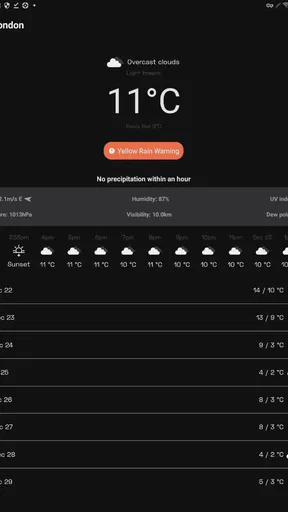
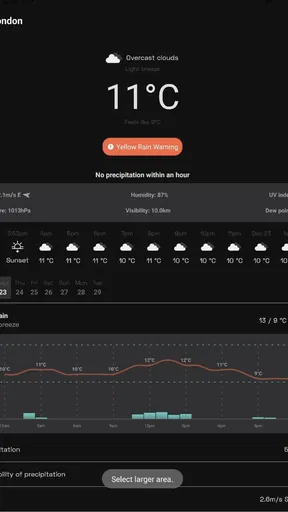
- Accurate forecasts with current conditions, hourly, and daily outlooks.
- Useful weather maps show radar, clouds, wind, and temperature layers.
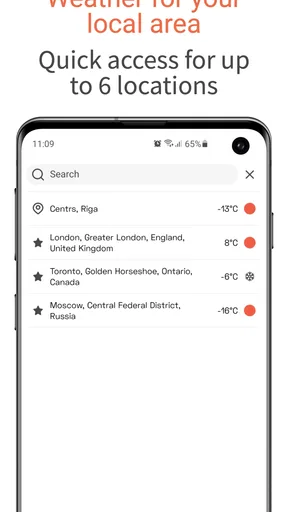
- Supports multiple locations for convenient travel and home monitoring.
- Provides weather alerts to help users prepare for severe conditions.
- Clean interface makes key weather details easy to find.
Limitations of OpenWeather
- Some advanced features require a paid subscription or API access.
- Forecast accuracy can vary significantly by location and weather type.
- The free version may display advertisements or promotional content.
- Data-heavy map layers can increase battery and mobile data usage.
- Some settings and detailed metrics may feel overwhelming for casual users.
Similar Picks in This Category
View All
Weather - By Xiaomi
Xiaomi Inc.4.1

Weather & Radar Forecast
WetterOnline4.8

Weather
OneLouder Apps4.6

AccuWeather: Weather Radar
AccuWeather3.6

The Weather Channel - Radar
The Weather Channel4.6

1Weather Forecasts & Radar
OneLouder Apps4.3
Frequently Asked Questions
What is OpenWeather, and what can I use it for?
OpenWeather is a weather information service that provides current conditions, forecasts, temperature details, precipitation data, wind information, and other meteorological insights. Depending on the app or service using OpenWeather data, you may also see weather maps, hourly forecasts, air-quality information, and alerts. It is useful for checking daily conditions, planning trips, monitoring outdoor activities, or simply keeping track of changing weather in different locations.
Is OpenWeather free to use on Android and iOS?
OpenWeather data may be available through free weather applications, although the exact features depend on the specific app that integrates the service. Some apps offer basic forecasts without payment, while advanced tools, extended forecasts, ad-free use, or additional map layers may require a subscription or one-time purchase. Before downloading, check the app’s store listing and privacy details to understand which functions are free and which may involve extra costs.
How accurate are the forecasts provided by OpenWeather?
OpenWeather forecasts are generated from meteorological data and forecasting models, so they are generally useful for everyday planning. However, no weather service can guarantee perfect accuracy, especially several days in advance or during rapidly changing conditions. Local geography, storms, and limited observation data can affect results. For important travel, work, or safety decisions, it is sensible to compare forecasts and pay close attention to official local weather warnings.
What permissions and personal data might an OpenWeather app require?
A weather app using OpenWeather may request location access so it can automatically display conditions for your current area. You can usually deny this permission and search for cities manually, although automatic location updates may not work. Depending on the app, it may also request notification access for alerts, internet access for updated forecasts, and permission to run background processes. Review the privacy policy before accepting optional permissions.
Does OpenWeather work worldwide and support multiple locations?
OpenWeather services cover a large number of locations around the world, making them suitable for checking weather at home, while traveling, or in several cities at once. The exact availability of forecast types, air-quality readings, maps, and alerts can vary by region and by the particular application. Most weather apps allow users to save multiple locations, but the number of saved places may depend on the app’s free or premium plan.
